
Weekly Newsletter Issue 107
Weekly newsletter summing up our publications and showcasing app developers and their amazing creations.


Welcome to this week's edition of our newsletter.
With WWDC26 just around the corner, we're excited to finally share that we will be there in person at the Mothership in Cupertino this year. We can't wait to experience everything Apple has in store, meet so many of you, and live it all together as a community
And who knows... we might even have something special planned.
Support us by becoming a sponsor!
Whether your goal is to raise brand awareness or promote your product or service, we offer flexible sponsorship options. We offer weeks, blocks of weeks, and even months to help you find your audience where they are.
 Create with Swift
For information about the current availability of weeks, send us an email.
From
The Community
A guide to macOS window toolbar styles in SwiftUI
Natalia covers all the modifiers you need to customize the macOS window toolbar in SwiftUI, from layout styles to title and background visibility.
 Natalia Panferova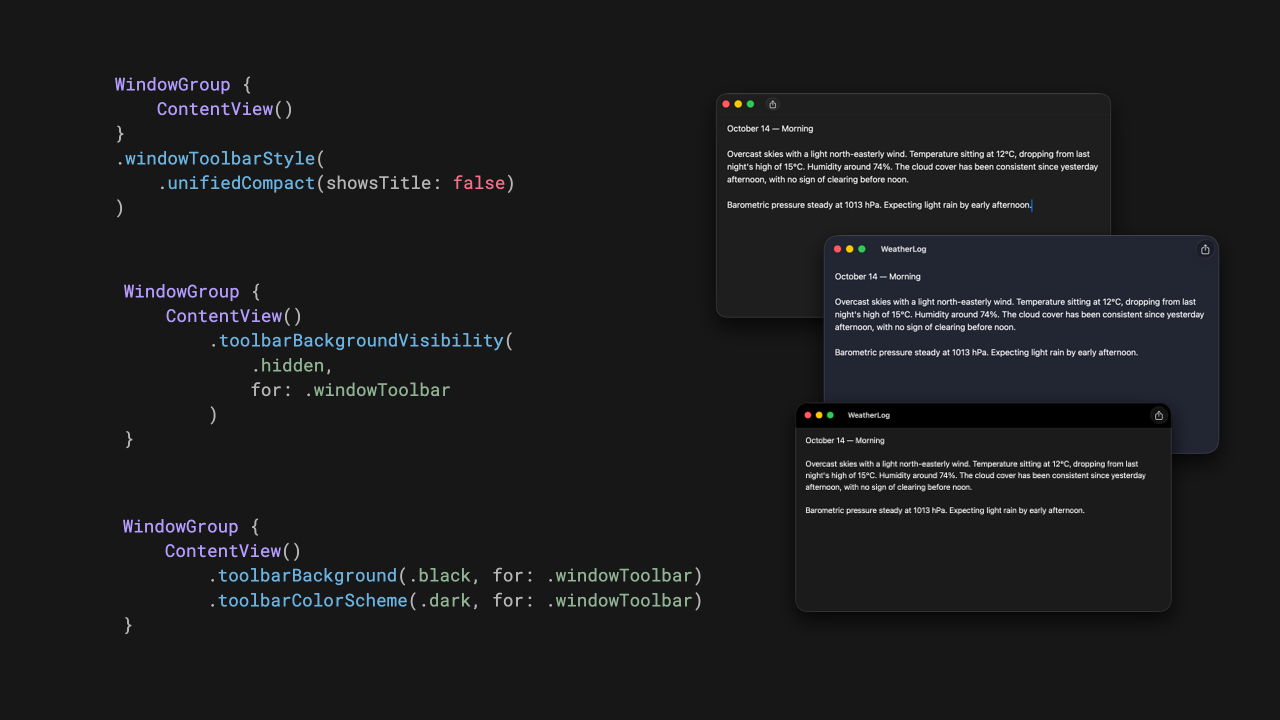
Finally found a use case for .fixedSize
Omar explains how .fixedSize(horizontal: false, vertical: true) solves a tricky card height layout problem in a horizontal scroll view.
 Omar Elsayed
How to Think About Performance in iOS
Artem walks through iOS performance as a layered system covering metrics, architecture, UI rendering, networking, caching, memory, and CPU behavior.
 Livsy
Livsy
Indie App of the Week
Touch Time
When you travel or have colleagues spread around the world, keeping track of different time zones becomes something you have to actively think about, one wrong assumption and you're missing a museum visit on holiday or calling a teammate in the middle of the night.
Touch Time, developed by yuhang, is the perfect tool for checking the time in different countries around the world, setting an alarm, or adding an event to your calendar with the timezone automatically added in the description of the event. It is worth mentioning the impeccable attention to detail in all of the app’s micro-animations and the care taken with even the smallest details, such as the possibility to rename a time zone with a custom name, perfect for keeping track of friends on the other side of the world.
A chapter of its own goes to the interaction model: a horizontal bar that lets you literally travel through time with a swipe, paired with haptic feedback that creates a surprisingly physical connection between the user and the concept of time itself.
 yuhang lu
Every week, people show up to write articles, organize events, and share what they're learning, and that energy is what makes this space worth being part of. Apple recently published a page featuring some of them, and you're probably already familiar with many of these names.


We also want to give a shoutout to everyone just getting started: the ones who published their first article, are about to ship their first app, or are simply sharing what they're learning along the way.
You're part of this too.
We can’t wait to see what you will Create with Swift.
See you next week!