Weekly Newsletter Issue 81
Weekly newsletter summing up our publications and showcasing app developers and their amazing creations.


Welcome to this week's edition of our newsletter.
A lot of aspiring developers started their careers and joined the Apple Developer community starting with the Swift Student Challenge.
Apple announced the submission date for this year, giving students from all around the world the opportunity to showcase their creativity and capabilities.

Published
This Week
This week we have covered Language Discovery, Creative Coding and visionOS.
Making Apps More Personal with Language Discovery
Letizia explores how to use iOS 26’s new Language Discovery APIs to detect a user’s preferred languages automatically and adapt content accordingly, showing how to interpret Language and LanguageDiscovery results to make apps feel more personal.
 Letizia Granata
Creative Coding: Randomness and Noise
Antonella shows how to apply randomness and noise in SwiftUI using Canvas, TimelineView and custom noise generators to create evolving, expressive visuals where algorithm meets art.
 Antonella Giugliano
Creating Ornaments in visionOS
Alfonso explores Ornaments in visionOS detailing how to use the ornament( ) modifier in SwiftUI to build custom controls and info panels that float just in front of your app window so they stay accessible without getting in the way.
 Alfonso Tarallo
Support us by becoming a sponsor!
Whether your goal is to raise brand awareness or promote your product or service, we offer flexible sponsorship options. We offer weeks, blocks of weeks, and even months to help you find your audience where they are.
 Create with Swift
For information about the current availability of weeks, send us an email.
From
The Community
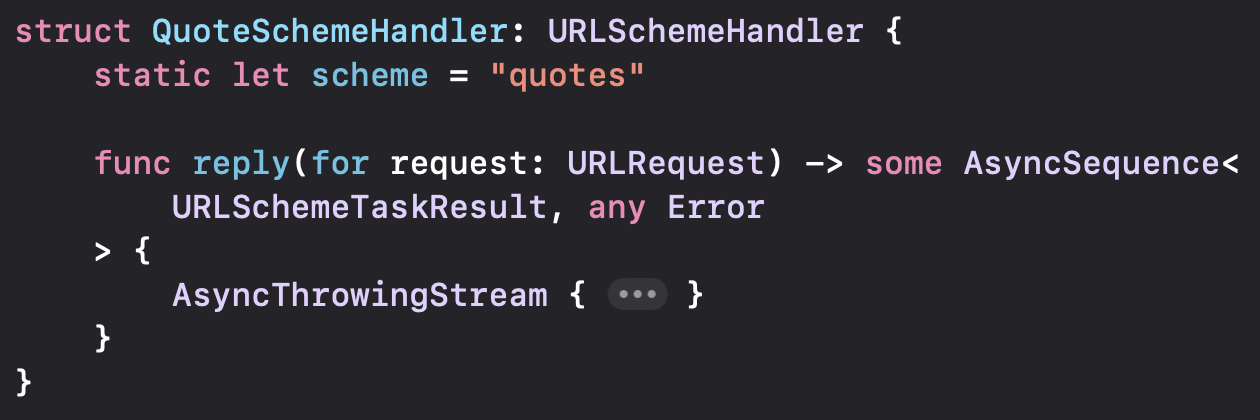
SwiftUI Custom URL Schemes
Keith explains how to register and use custom URL schemes in iOS 26’s WebView and WebPage APIs showing how to implement the URLSchemeHandler protocol, register scheme handlers and load local resources with a custom scheme.

Zooming With The Magnify Gesture in SwiftUI
Gabriel walks through how to implement the magnify gesture (pinch-to-zoom) in SwiftUI showing how to attach the MagnificationGesture to a view, track scale changes and apply them smoothly to your content.

Smoothly Switching Between Layouts in SwiftUI with AnyLayout
Artem demonstrates how to use AnyLayout in SwiftUI to toggle between different layout containers with animation while preserving view identity and enabling smooth transitions across layout changes.
 Livsy
Livsy
Indie App of the Week
toolslink
This link manager app helps you organize, find, and share links with minimal effort. The app developed by Mohit automatically tags links based on content and context and includes a share extension so you can save from multiple apps in one step.
The interface focuses on simplicity with quick actions for common tasks, with a native look and feel, integration with iCloud sync and handy widgets to have always our links in the Home Screen.
 Mohit Arora
Apple has rolled out an updated version of the App Store website with featuring a clean, modern design and improved navigation. The refreshed web experience now lets users browse the complete catalog of apps available across all Apple platforms making it easier to discover, preview, and learn about apps directly from any browser.
We can’t wait to see what you will Create with Swift.
See you next week!